Summary
This completes the Vector Search hands-on. Great work! 🍺
What You Learned
Value of Building Blocks + IBM Bob
- Significant development time reduction: Completed in approximately 90 minutes what would take days to weeks
- High-quality implementation: Code generation based on best practices
- Natural language instructions: Feature addition possible without programming knowledge
Implemented Features
- Product image display: Added images to search results
- Price filter: Filter by price range
- Recommendation reason: Display why a product is recommended
Vector Search Overview
- Searches by understanding the "meaning" of words
- Unlike traditional character search, finds similar meanings even with different phrasing
Use Cases in IBM Products
- watsonx Discovery: Automatically extracts relevant information from large volumes of documents and presents optimal answers to user questions (product image display)
- watsonx Assistant: Understands customer inquiries and automatically generates optimal responses from similar past cases (price filter)
- watsonx Orchestrate: Understands entire business processes and automatically executes appropriate workflows according to user intent (recommendation reason)
Use Cases in Familiar Services
- Google Search: Finds pages and answer candidates with similar meaning even when the words do not exactly match (recommendation reason)
- Amazon: Finds products by description or use case even when the product name is unknown, and recommends similar products (product image display, price filter, recommendation reason)
- YouTube: Suggests videos users may want to watch next based on viewing history and video similarity (product image display, recommendation reason)
- Netflix: Recommends titles close to watched genres, atmosphere, and viewing patterns (product image display, recommendation reason)
- Spotify: Finds music close to favorite songs or playlists and reflects it in recommendations and automatic playlists (product image display, recommendation reason)
- Instagram: Ranks posts and ads based on similarity in photos, videos, hashtags, and interests (product image display, recommendation reason)
- Facebook: Shows feeds, groups, and ads close to post content and user interests (product image display, recommendation reason)
- TikTok: Recommends short videos close to user preferences based on watching, skipping, and likes (product image display, recommendation reason)
- Google Photos / Apple Photos: Finds photos with meaning close to words such as "sea", "dog", or "sunset" (product image display)
- ChatGPT / AI Chat: Searches internal documents or knowledge close to a question and uses them as answer evidence (recommendation reason)
Deployment to Production Environment
Current Configuration (For Learning)
- Hugging Face + Milvus: Completely free, offline support, optimal for learning
Migration to IBM Products
- watsonx.ai: Enterprise-grade, advanced models, commercial support
- watsonx.data: Large-scale data integration, governance features, petabyte support
Selection Guide
| Scale | Recommended Configuration |
|---|---|
| Learning/PoC | Hugging Face + Milvus |
| Small-scale production | Hugging Face + Milvus |
| Medium-scale production | watsonx.ai + Milvus |
| Large-scale production | watsonx.ai + watsonx.data |
Value in Customer Systems
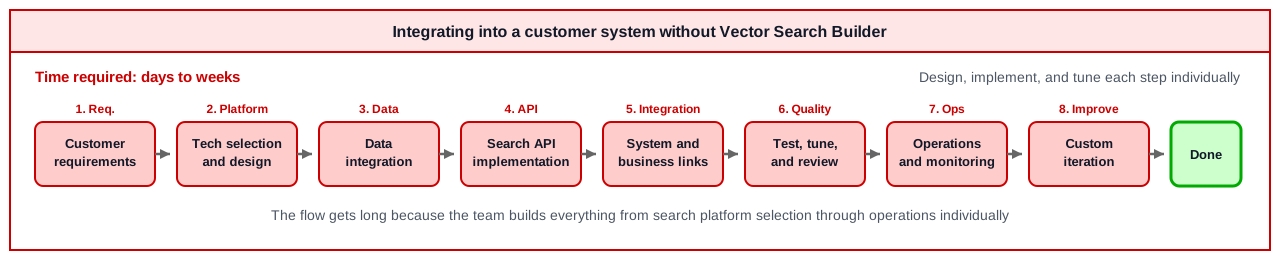
When integrating Vector Search into a customer's existing system, it is not enough to build only a search API. You need to connect data integration, embedding generation, vector databases, search APIs, screen display, and operations design. By using Vector Search Builder + IBM Bob, teams can reuse the foundation for technology selection and implementation while focusing on customer-specific requirements.
When integrating into a customer system without Vector Search Builder:
When integrating into a customer system with Vector Search Builder + IBM Bob:
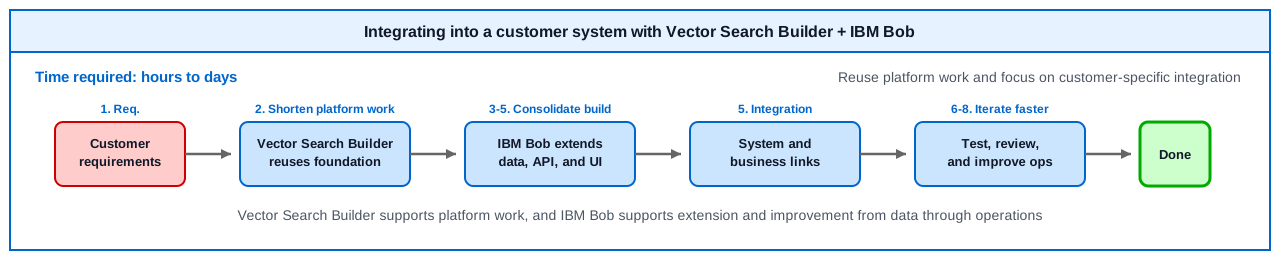
This difference makes it easier to deliver the following value in projects.
- Faster startup: Prepare the basic Vector Search configuration in a short time
- Focus on customer requirements: Spend time on differentiating parts such as business data, screens, search conditions, and explanation text
- Easier iteration: Quickly tune search results and UI by asking IBM Bob in natural language
Challenge
Advanced Challenge: Comparison of Search Methods in Agentic RAG
Theme: Investigate the differences in Harness Engineering between Lexical Search and Vector Search in Agentic RAG!
Investigation Points
-
Lexical Search
- Traditional search like keyword matching, BM25
- Search accuracy through exact or partial matching
- Use cases in Agentic RAG
-
Vector Search
- Search based on semantic similarity
- Representation learning through embedding models
- Use cases in Agentic RAG
-
Harness Engineering
- How to combine both methods
- Hybrid search implementation patterns
- Scoring and re-ranking strategies
-
Differences in Agentic RAG
- Impact on agent decision-making
- Relationship between search accuracy and response quality
- Cost and performance trade-offs
Recommended Approach
- Implement and compare both methods in actual use cases
- Quantitatively evaluate search accuracy, response time, and cost
- Utilize Building Blocks' Agent Builder mode
- Document and share evaluation results
Through this challenge, you can understand important decision points in RAG system design.